
When Attackers Modify Your Mail Flow
How attackers abuse inbound connectors for persistence and internal phishing in M365
Attackers Are Getting More Sophisticated
Attackers targeting Microsoft 365 are refining every stage of their approach.
Persistence is evolving too.
It used to be obvious:
- Add an inbox rule.
- Move everything to "RSS Feeds."
That still happens.
But, attackers are increasingly getting crafty.
In a recent compromise, an attacker altered tenant-level mail flow within 5 minutes of initial access.
Let's dive in.
5 Minutes From Initial Access to Modified Mail Flow
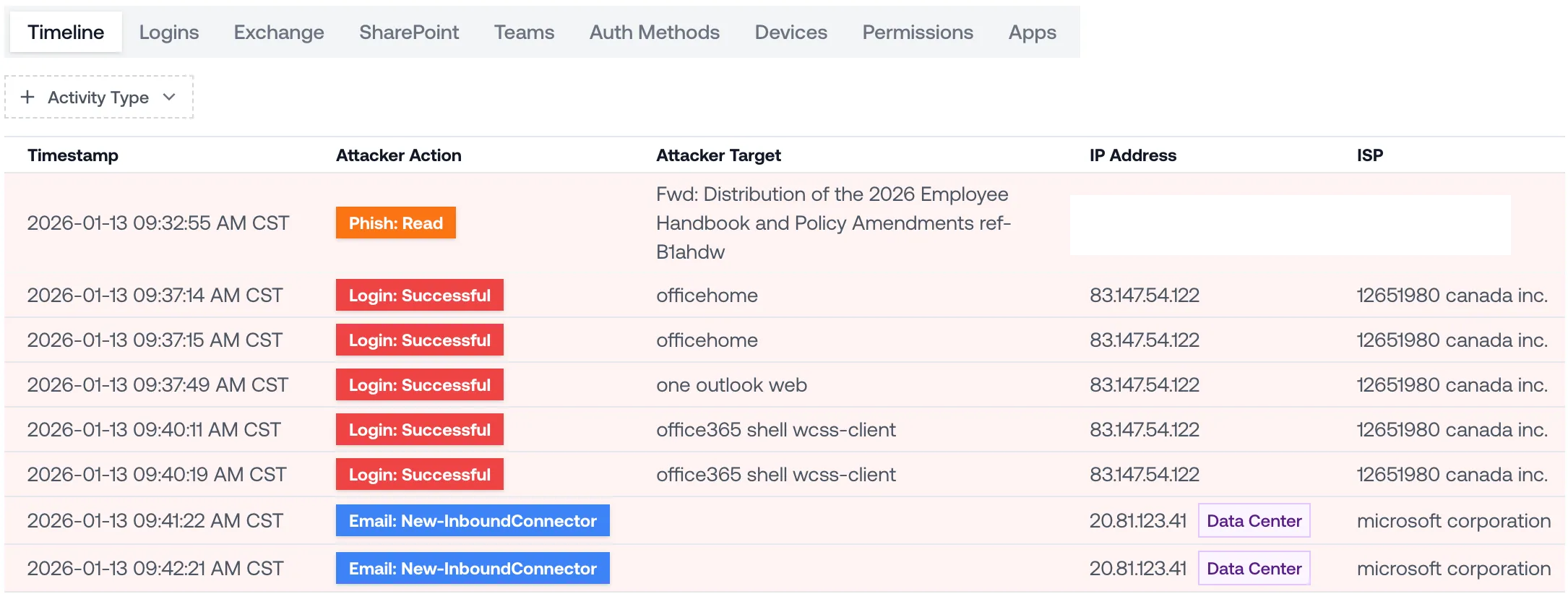
Here's the timeline of the compromise:
- The attacker initially logs in at 9:37:14 AM
- The attacker adds two inbound connectors, at 9:41:22 AM and 9:42:21 AM respectively, within ~5 minutes of initial access
What's An Inbound Connector?
An inbound connector is a mail flow configuration that defines which external systems your tenant trusts to send email into it.
Inbound connectors are intended for legitimate scenarios like:
- Routing mail from on-premises Exchange servers
- Accepting mail from third-party gateways
- Applying security restrictions for business partners
Basically, inbound connectors tell Microsoft: "Mail from these IPs is trusted."
That means if an attacker creates a malicious inbound connector, they can:
- Whitelist attacker-controlled IP addresses
- Bypass certain authentication checks
- Inject email directly into the tenant
This allows attackers to establish a backdoor. Even after they're locked out, they can deliver phishing emails into the tenant from infrastructure they control.
What's The Attacker Trying to Do?
Now, let's take a closer look at the two inbound connectors added by the attacker:
- Type:
OnPremises - Sender IP: attacker controlled infrastructure
- 151.244.170.227 — ISP = Interserver, data center in NY
- 151.241.8.103 — ISP = OVH, data center in Germany
- Sender Domains:
*(all domains)
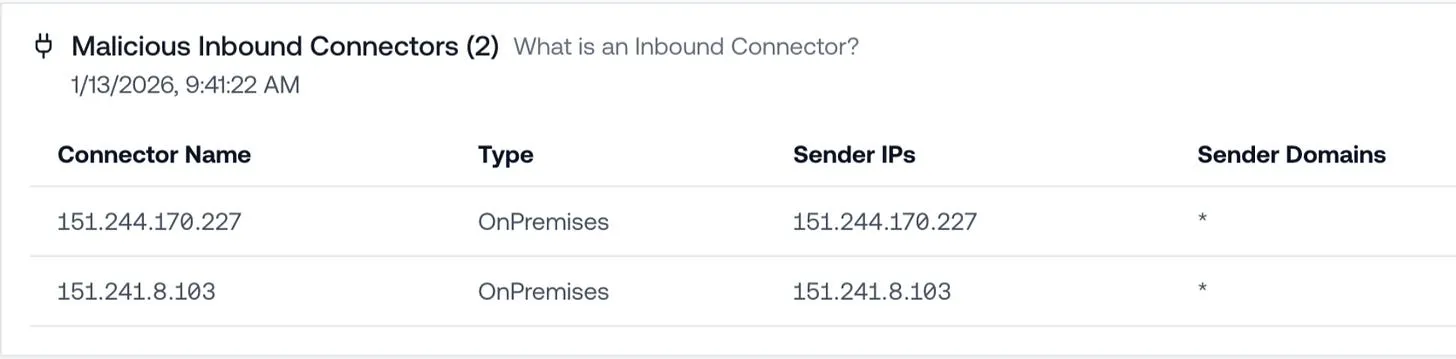
By setting the connector type to OnPremises, the attacker is telling Microsoft 365:
Treat mail from the attacker IPs as trusted on-premises infrastructure.
By allowlisting * for sender domains, they're saying:
Accept mail from any domain.
This enables the attacker to launch a tenant-wide phishing campaign from their own servers.
The phishing emails are guaranteed to land in users' inboxes, and they'll look like they're coming from internal users.
Takeaway: Containment Doesn't Stop at Password Reset
In this case, the attacker needed less than five minutes to establish persistence at the mail flow layer.
Resetting the password and revoking sessions wouldn't fix it — the connectors would still allow phishing into the tenant.
This is why it's so important to track every action the attacker takes while they have access. Locking the account is only half the job.





See what's in your last six months of logs.
Get insurance-grade forensics on the last 6 months of your M365 logs. Setup takes 5 minutes with results in 48 hours.